Iron & Alloy 26.10.0 CTP Preview · Steel 26.10 · Available now
Your infrastructure. Forged for what comes next.
Turn the hardware you own into dependable private infrastructure. Wise Foundry brings compute, containers and fleet management together in secure, ready-to-run appliances that stay consistent and recover automatically.
Start with what you need today and add more without changing foundations. Iron runs your servers, Steel gives automated containers a focused home, and Alloy brings the whole estate together.
CTP Preview
Turn every server into a secure home for virtual machines, system containers and Docker.
Install Iron like a hypervisor. Use the browser for everyday work and the on-machine console when you need direct access.
Version
26.10.0
Workloads
KVM virtual machines, LXC system containers, Docker and Compose stacks
Ships as
UEFI installer ISO, 16 GiB raw disk image, .ironupd update bundle
Manage
Foundry Console at https://<host>/ · Iron Console on the machine’s display or BMC, or a serial port when you turn one on · recovery console on :9443 before the agent starts
A purpose-built container appliance that turns infrastructure-as-code into running services.
Deploy Steel on Iron or any UEFI virtual machine. The API keeps deployments repeatable, while the web and VM consoles cover operations, backups and troubleshooting.
Version
26.10.0
Workloads
Docker containers and Compose stacks, with images, volumes and networks, created through the API only
Ships as
OVA in Iron's format (q35, UEFI, 2 vCPU, 2 GiB, qcow2 disk), installer ISO, .steelupd bundle
Manage
REST API and web console on :8443 · Steel Console on the VM console or serial port
Operate
Encrypted backups, support bundles, metrics, audit log, remote syslog
Manage every Iron host, workload, network and update from one place.
The guided installer deploys Alloy in your Foundry environment. Enroll each host with a one-time code, then manage the estate from one place while each host remains in control.
Version
26.10.0
Manages
Enrolled Iron hosts in clusters: VMs, LXC and Docker containers, datastores, port groups and virtual routers
Ships as
Installer ISO with a Linux and a Windows wizard that deploys Alloy onto a Steel appliance on an Iron host, .alloyupd image pack
Manage
Web console and REST API on https://<alloy>/ · every call to a host signed and certificate-pinned
Security starts before the operating system. Each stage verifies the next and every core component is signed, so an unauthorized change stops the boot before it can take control.
UEFI Secure BootFirmware checks the boot loader against the Foundry db key.
systemd-bootSigned boot loader, built with Iron’s own changes, with boot counting and an A/B fallback.
Signed UKIKernel, initramfs and Iron’s own parameters signed together as one file, carrying the update key.
Signed image manifestThe boot loader’s stub verifies the slot’s Ed25519-signed manifest before the kernel starts, and the initramfs verifies it again.
dm-verity rootA read-only EROFS root, every block checked against the hash the manifest names. No package manager in the base image.
Health checkThe agent and its services must come up healthy before the boot is marked good.
Kernel boot options are yours to change, but the essentials that guard this chain can’t be overridden. Updates follow the same process: each signed bundle is verified before anything is written.
Updates without the anxiety
Move forward with a way back
Each host keeps the working release while the new one starts in a separate system slot. If its health checks fail, the host returns to the last working version and tells you what happened. A change to the kernel boot options is tried the same way, with the image’s defaults to fall back to.
Updates and rollbacks replace the system, not your configuration, application data or datastores.
Upgrade from installer media, the console, the API, a URL or the command line. Any earlier Iron or Steel release can move directly to the latest version.
Alloy handles updates across a fleet. It synchronizes trusted depots, checks hosts against your baseline and updates them one at a time. It also coordinates updates for Alloy and its Steel appliance.
IRON_ESP / loader / entriesDuring an upgrade
iron-26.10.0-b+2-1.confOn trial New version in slot B, its UKI and signed manifest beside it. Two boot tries left, waiting for iron-health.
iron-26.09.0-a.confGoodPrevious version in slot A, still installed. systemd-boot falls back here automatically.
/persist · /varUntouchedHost configuration and workload data stay exactly as they were.
Release channels & support
Choose your release path
Use the rolling channel for the latest Wise Foundry features and community support, or choose an LTS build with additional testing and paid professional support.
Rolling releases
Get new features, improvements and fixes as they become available. Rolling builds include community support.
LTS builds
LTS builds receive additional testing and are available to professional-support customers who need a more predictable release cycle.
Professional support
Paid support includes LTS builds and direct help from Wise Global Solutions. The rolling channel remains available for community-supported deployments.
Wise Foundry Iron 26.10.0 · CTP Preview
Iron turns servers into infrastructure
Run virtual machines, system containers and Docker on one familiar platform. Iron keeps every host on a trusted release as your environment grows.
Manage each host in one place
Every Iron host includes a web console, so your team can manage it without deploying another server.
See health, performance, logs, events and audit history
Track long-running operations in Recent tasks
noVNC and serial consoles for VMs in the browser; shells for containers
Datastore browser with uploads, downloads, moves and folders
kSwitches, oSwitches, port groups and virtual routers, with automatic revert for management changes
Manage virtual machines, system containers and Docker in the same interface
Administrator, Operator and Read-only roles, plus custom roles scoped to guests, tags, datastores or port groups
A firewall tab on every VM and system container, and AppArmor profiles and denials under Manage
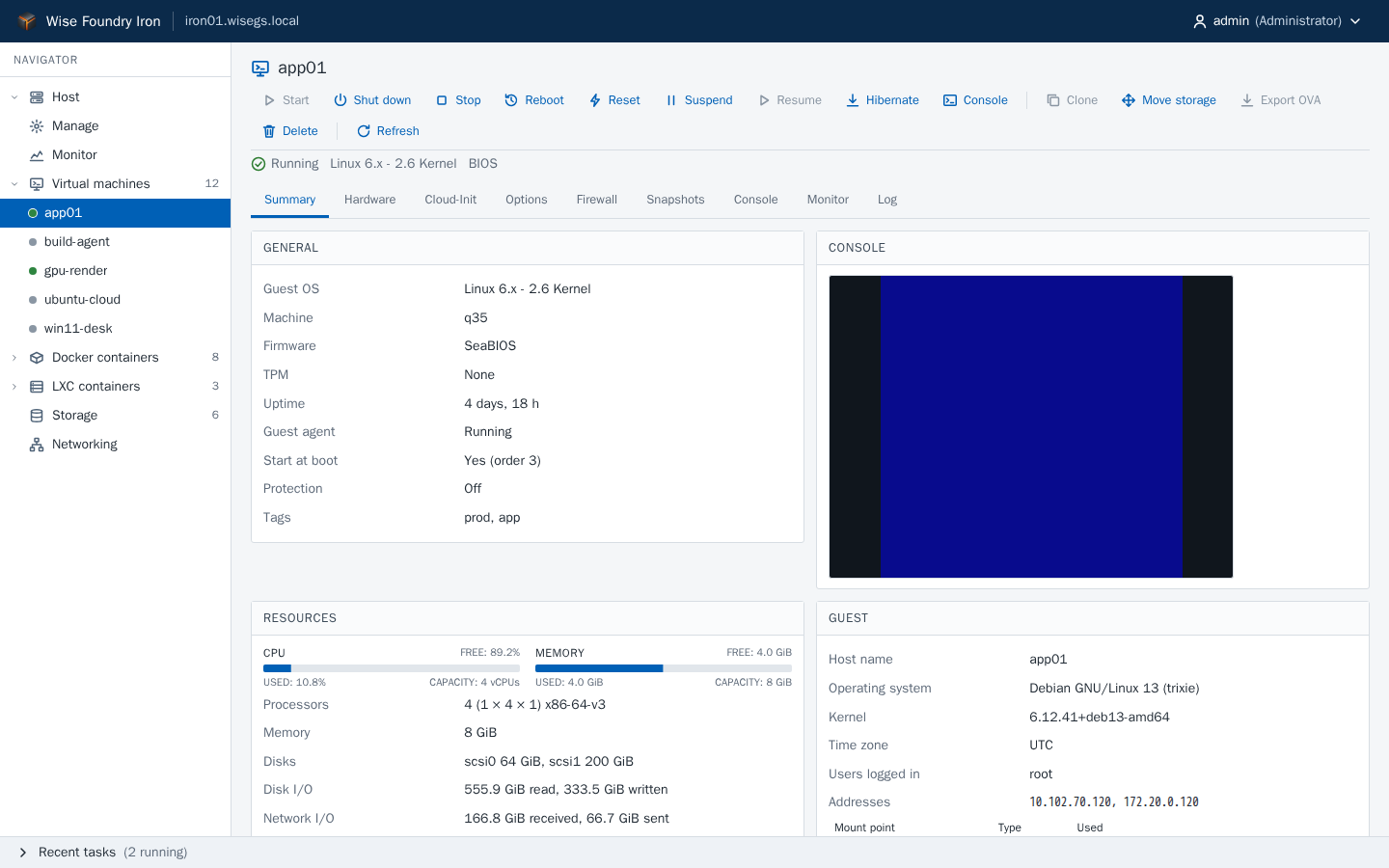
https://iron01.wisegs.local/vms/app01/summary
A virtual machine's page, from the console's automated screenshot run against its mock API.
One screen from power-on to shutdown
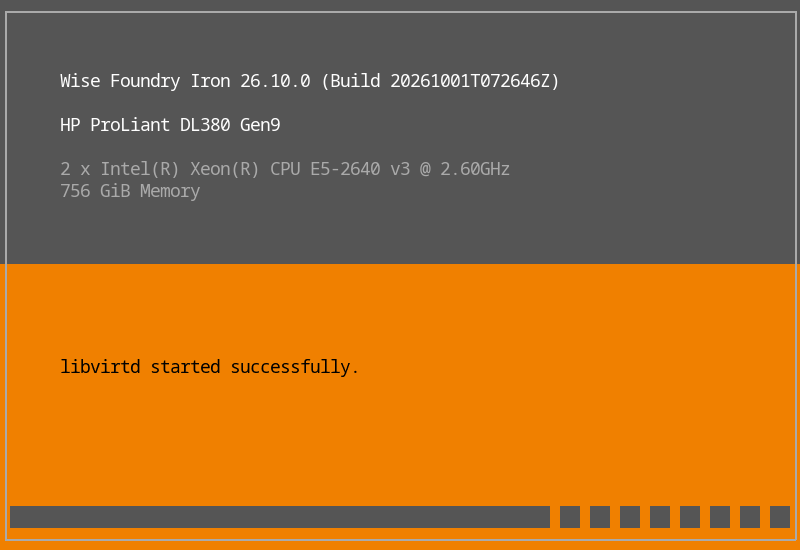
Iron starts like the hypervisors your team already knows. The boot loader shows what it is about to load and counts down, with ENTER to boot and SHIFT+O to edit the boot options; any other key opens the boot menu, with the other slot and a rescue entry.
Every check is on the screen as it happens: the image manifest and its key, the root image, each plugin and who signed it, then each service as it starts
Warnings, such as text the firmware added to the command line, show in red and are reported in the host’s health
Restarting and shutting down use the same screen, naming each service as it stops and the workloads as they shut down
The display is the console by default. A serial console is a boot option, as a mirror or as the primary console
The boot screen, rendered at 80×25 from the Iron Console’s own screen code with a test host’s details, as its screen tests draw it. On the machine it fills the display.
Direct access at the machine
When the host is up, the Iron Console takes over where the boot screen was, in the same layout. From the physical screen, BMC or serial port, you can see the host’s hardware, health, services, storage and management addresses.
Use F2 to configure networking safely, run tests and enter maintenance mode
Roll back and reach logs or support information directly from the keyboard
Emergency shell and SSH are off by default and show a warning while enabled
Guided installer with install and upgrade modes, plus unattended answer files
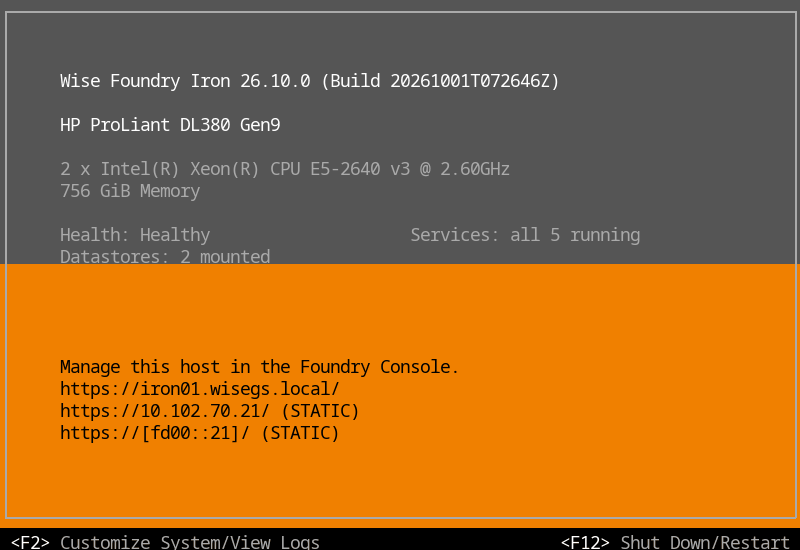
The Iron Console’s main screen, rendered from its own screen code with a test host’s details. F2 customizes the host, F12 shuts it down or restarts it.
Tune the kernel, keep the essentials
Kernel boot options are free-form text, edited in the Foundry Console under Manage › Advanced, in the Iron Console, from the command line or once at the boot menu. Presets fill in common settings, and every word is checked as you type.
Only the options that protect the boot are refused: Iron’s own parameters, what runs first, module signature enforcement and kernel lockdown
A change is tried like an update: after three failed boots the host falls back to the image’s defaults
Your options carry over to every update
The root’s trust no longer rides on the command line: it comes from the signed image manifest
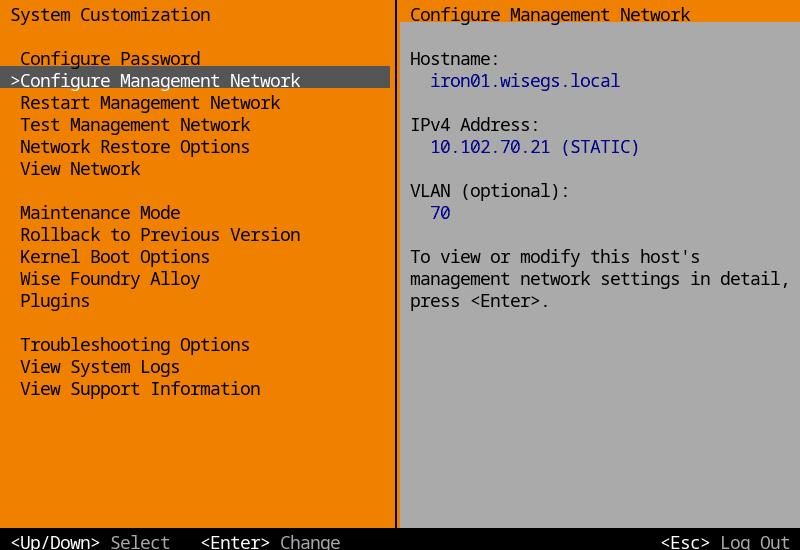
System Customization, rendered from the Iron Console’s screen code with a test host’s details.
Virtual machines
libvirt QEMU/KVM with SeaBIOS or OVMF, TPM 2.0, q35, VirtIO, PCI and USB passthrough, cloud-init, virtiofs, snapshots and clones. Disk locks keep two hosts from ever running the same disk.
LXC containers
System containers from the linuxcontainers.org catalog, unprivileged by default, with qcow2 root disks on datastores, snapshots and clones. Debian, Ubuntu and other systemd distributions run their sandboxed services and service credentials under the container’s own AppArmor profile.
Docker & Compose
Create, edit, log, shell and monitor containers, or deploy Compose stacks with validation, pull progress and automatic rollback. Containers get their own addresses on port groups.
kSwitches & oSwitches
Kernel bridges with NIC teaming and LACP carry the krn management and storage adapters, over IPv4 and IPv6, or IPv6 alone for management. Open vSwitch oSwitches carry the VLAN port groups that VMs, LXC and Docker attach to.
Isolation by default
Every VM and system container gets its own stateful firewall and anti-spoofing, and runs under its own AppArmor profile; Docker containers are filtered and confined the same way. Your own AppArmor rules sit in custom files beside Iron's, so every fix Iron ships still arrives. Imported disk images are read by an unprivileged helper.
Virtual routers
Connect port groups with DHCP, DNS, source NAT, port forwards, floating addresses and static routes, each in its own network namespace.
Import & export
Import VMware, VirtualBox and standard OVF 1.x appliances from a datastore or URL, or a Proxmox vzdump backup of a VM or container, and export to OVA with VMDK or qcow2 disks. Iron-to-Iron moves keep every setting.
Datastores
Local directories, ext4 or xfs disks, and NFS shares (v3 to 4.2) for a shared ISO library, VM disks and container data.
Plugins
Signed, dm-verity protected layers that bring their own API endpoints and console pages, so a host carries no code for a feature it doesn’t have. A bad plugin set falls back to the last one that booted. The plugin SDK builds and signs your own.
Storage plugins
ZFS pools and datasets, NFS exports, iSCSI in both directions, with sessions bound to the adapters you choose and multipath across them, and a shared OCFS2 volume several hosts can mount at once — each installed only where it’s wanted.
Recovery & support
A recovery console on 9443 answers before the agent: pull a support bundle, read the logs, restart a service, disable a plugin or roll back on a host that hasn’t finished booting. Support bundles never include passwords, private keys, enrollment codes or container environments.
Hardware transcoding
Pick a render node from a list that names the card behind it, read from the PCI database on the host. Share one GPU across several containers or system containers.
Secure Boot
Images carry Foundry's Secure Boot keys, and each slot's signed image manifest is checked by the boot loader and again by the initramfs before the root opens. Put the firmware in setup mode and enroll the keys from the boot menu. Online updates signed with another key set are refused; move a host to another key set by upgrading from the ISO.
Access control
Local users, LDAP directories and OpenID Connect single sign-on, with TOTP second factors. Built-in and custom roles, each scoped to guests, tags, datastores or port groups. SSH and the emergency shell are off by default; SSH accepts only root with keys added in the console.
Backup & restore
Back up the host's configuration and sealed secrets with a passphrase, and restore it onto a fresh install or a different machine. Guests are exported or backed up incrementally through the API, by Alloy or your own scheduler.
Monitoring & alarms
Live and historical host metrics, hardware sensors, alarms with e-mail and webhook notifications, remote syslog and SNMP, plus an audit log of every change.
Maintenance & autostart
Put a host in maintenance mode before you work on it, and start again what it shut down when you leave. Guests start and stop in the order you set, with delays, when the host boots or shuts down, and every restart and power-off takes one path that finishes even when a serial port holds the console.
Ready for Alloy
Enroll a host with an Alloy code. The host pins Alloy's certificate and checks every signed call against Alloy's Ed25519 key. Alloy then shows the host with these very pages, and uses its API to move guests between hosts and back them up.
Wise Foundry Steel 26.10 · Available now
Steel makes automation operational
Steel gives automated container workloads a focused place to run, with the consistency and automatic recovery of the Foundry foundation.
From code to running containers
Every service is defined through the API, so each deployment is captured in code. Supply the OVA properties and the appliance starts ready for automation.
One consistent /api/v1 for containers, images, volumes and networks
Compose stacks as YAML at /api/v1/stacks, validated against the same safety rules
Bearer tokens stored as SHA-256 digests; browser sessions with CSRF protection
Upload, verify, apply and roll back signed .steelupd bundles over the API
The web console gives operators safe start-and-stop control without changing the declared configuration
The data disk grows at boot when you add space to it
alloy@ops — bashsteel01:8443
# Create a service container on a Steel appliance$ curl -k -H "Authorization: Bearer $TOKEN" \
-H 'Content-Type: application/json' \
-X POST https://steel01:8443/api/v1/containers \
-d '{"name":"dns",
"image":"coredns/coredns:1.12.1",
"network":"host",
"restart_policy":"unless-stopped",
"volumes":[{"type":"data","path":"/dns",
"destination":"/etc/coredns"}]}'# Roll out a new Steel release, then reboot into it$ curl -k -H "$H" -d '{"path":".../steel-26.11.0.steelupd"}' \
https://steel01:8443/api/v1/updates/apply
$ curl -k -H "$H" -d '{"action":"reboot"}' \
https://steel01:8443/api/v1/host/power
Examples adapted from the Steel README. A failed update reports rolled_back instead.
Appliance status at a glance
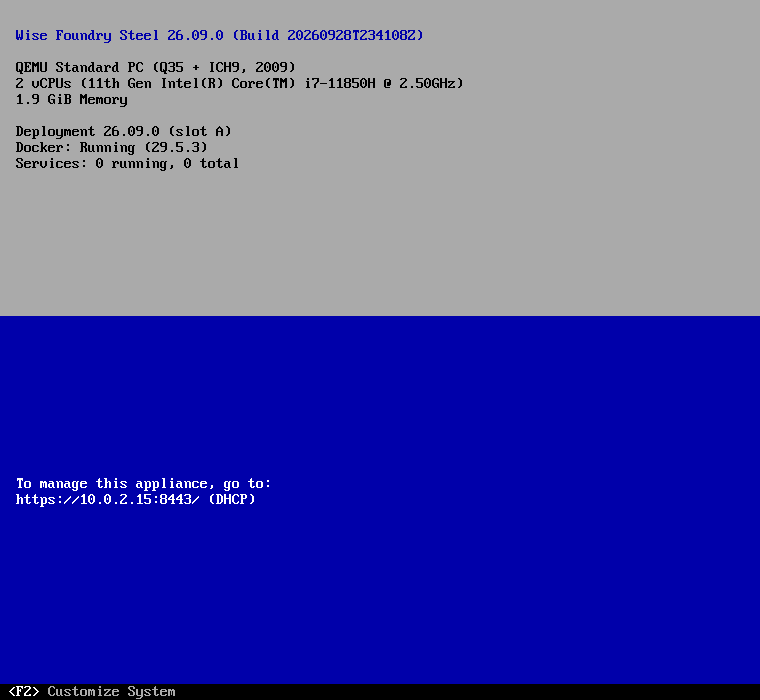
The VM console and serial port show Steel's version, virtual hardware, Docker health, services and management address. Alerts highlight anything that needs attention.
F2 sets the administrator password on first start, then opens System Customization
Configure Management Network: DHCP or static IPv4, DNS and host name, validated before anything changes
Configure Time: time zone and NTP servers
Troubleshooting Options: emergency shell, SSH and a management agent restart
The Steel Console of a freshly deployed 26.10.0 appliance, captured from its own display in QEMU and cropped to its text. It refreshes every 5 seconds.
Access for people and automation
Administrators use the web and VM consoles, additional accounts are managed through the API, and automation uses dedicated API tokens.
Role
Can
Administrator
Everything: containers, tokens, updates, power, host name, network, time, services, SSH, emergency and service shells
Operator
View, start and stop, create and remove containers
Read-only
View the appliance and its containers
Container API
Create and recreate containers as tracked jobs, with the previous container restored if a recreate fails. Pull images, and manage data volumes and bridge networks; live logs, stats and specs. Script it from PowerShell with the WiseFoundry module.
Compose stacks
Deploy Compose projects as YAML with environment values. Create, update with rollback, start, stop, pull, down and delete, with per-service logs. Published images only.
Web console
Iron's layout with Recent tasks: host summary, host name, network and time, services, updates, and Start and Stop for containers and stacks. HTTPS on :8443.
Deployment
An OVA in Iron's format with deployment properties for host name, network, admin password and API token, or the UEFI installer ISO with unattended answer files. The data disk grows at boot.
Signed updates
A/B slots and Ed25519-signed .steelupd bundles. A new version is kept only once the agent and Docker are healthy; otherwise Steel rolls back on its own.
Backup & restore
Configuration and stack backups with optional AES-256 encryption and container data. Restores are staged and applied at the next boot, optionally keeping the network settings.
Monitoring & support
An hour of host metrics, logs, audit events and remote syslog. Support bundles leave out passwords, tokens, private keys and container environment values.
Secure by default
SSH and the emergency shell are off by default. Logins are rate-limited, host-network containers need an Administrator, and /persist is mounted noexec.
Alloy appliance
Alloy's stack runs as Compose services on a Steel appliance, and Alloy keeps that appliance up to date itself: from its Update Management, or from its installer when it upgrades Alloy.
Wise Foundry Alloy 26.10.0 · CTP Preview
Alloy makes many hosts feel like one
Alloy manages every Iron host in one place without taking control away from the host. Each action is authenticated, permissions are enforced, and every host remains independently manageable. Alloy is a CTP Preview and a proof of concept: ready to evaluate with Iron, not yet to run your estate.
One view of every workload
Alloy brings every host and workload into one inventory. Open a workload to use the same Foundry Console pages you see on its host.
Explore the same inventory by folder, host or workload type
The host's own tabs and toolbar, plugins' additions included
Migrate, move, organize and create templates from the same toolbar
An Alloy tab with the folder, identity, tags and desired state Alloy keeps
Every call signed by Alloy and checked against your own role before it reaches the host
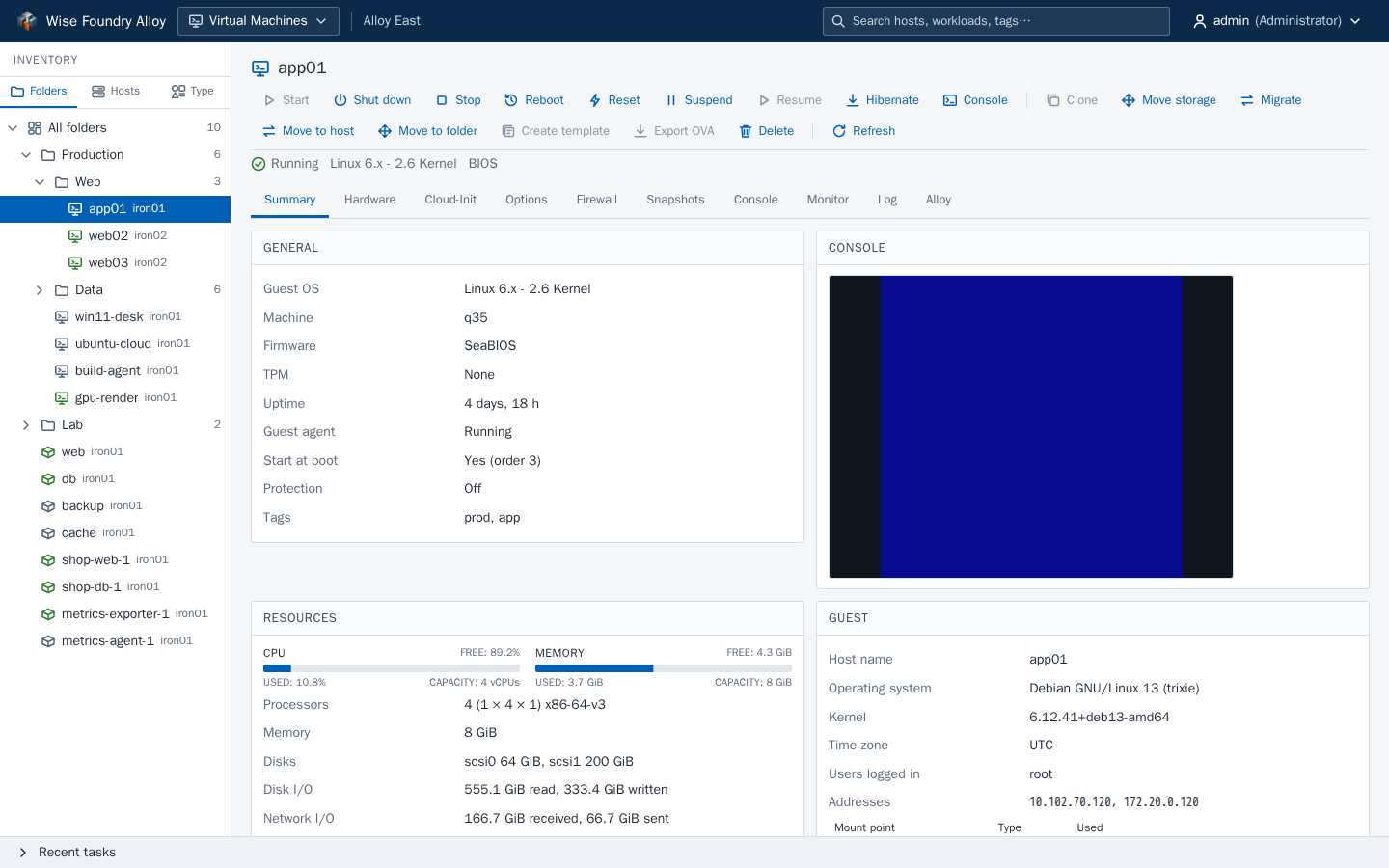
A virtual machine in Alloy, from Alloy's automated screenshot run against a mocked API.
The whole fleet, down to each host
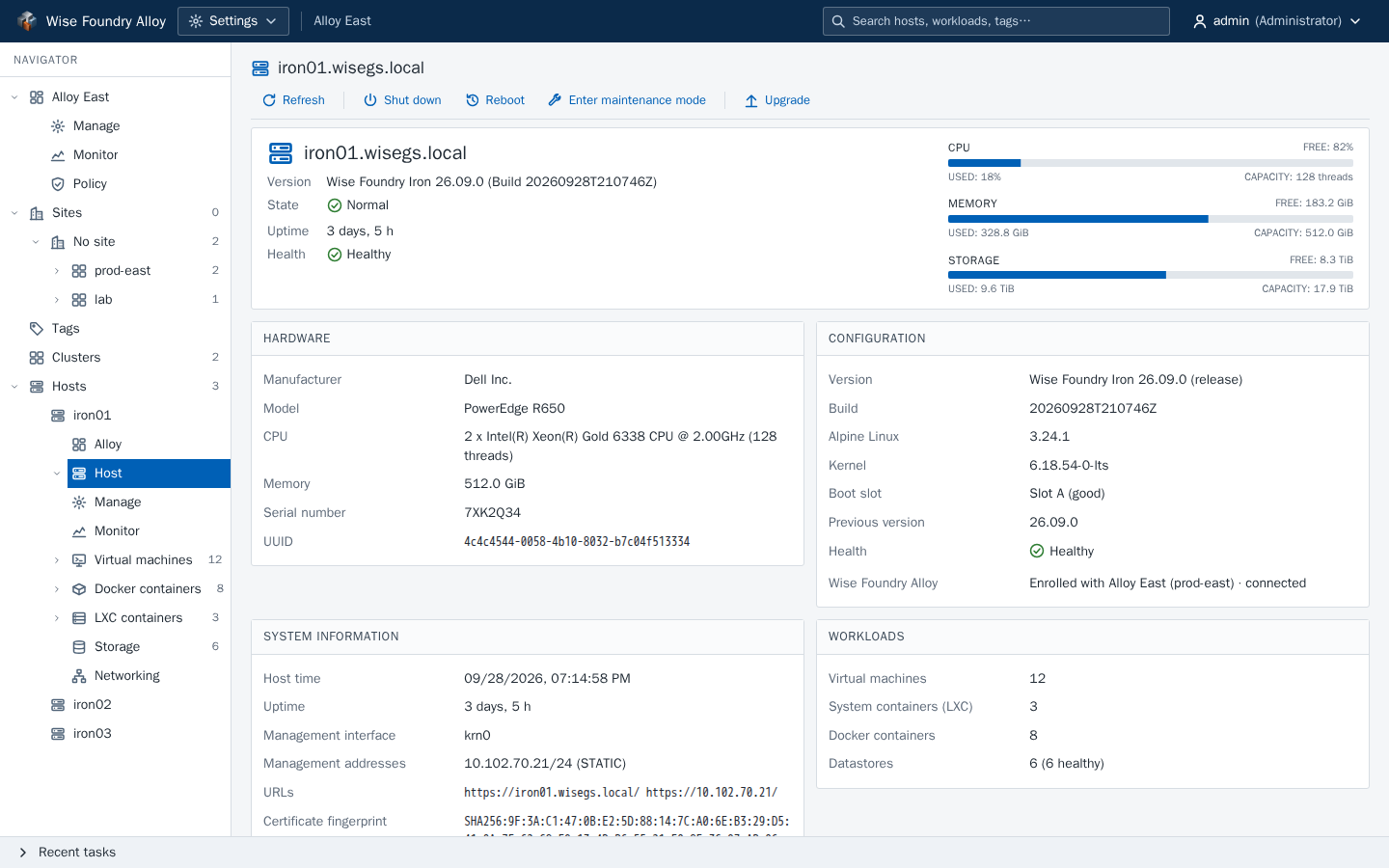
Open any host to see its own navigation and pages within the wider context of sites and clusters.
Sites, clusters and hosts in one tree, with counts
Each host's own summary, settings, monitoring, storage and networking
Enrollment, heartbeats, maintenance and evacuation on the host's Alloy page
One console for the estate, while each host remains independently manageable
https://alloy.wisegs.local/hosts/iron01/host
An Iron host in Alloy, from the same screenshot run.
Enrollment
Enroll a host with a single-use code from its own console. The host pins Alloy's certificate and verifies every call against Alloy's Ed25519 key; Alloy pins the host's in return, and key rotation and certificate re-issue need no re-enrollment.
One inventory
Every host's VMs, LXC and Docker containers in one tree, by host, by kind or in folders that span hosts, with tags, sites and search. Create, start, snapshot, clone, edit and delete them from the same pages.
Moves & maintenance
Live-migrate machines and move containers between hosts in a cluster, with CPU and shared-storage checks first. Put a host in maintenance, or evacuate everything on it to the rest of its cluster.
Consoles
Graphical and serial consoles for VMs, Console, TTY and Shell for LXC, and exec for Docker, through Alloy's own session. Alloy signs the upgrade and passes the frames through untouched.
Storage & networking
Datastores and the datastore browser for every host, and a new NFS datastore on the hosts you choose. Port groups, oSwitches and virtual routers across a cluster, with the hosts where a name is missing or disagrees.
Policy & guardrails
Resource pools and quotas, cluster admission, affinity rules and approval policies, checked before any host is asked. Admission is checked under a lock, so two requests can’t both take a host’s last room. Batch moves and evacuations wait for an approver, and a new workload joins its affinity rules as it’s created.
Resource balancing
Alloy measures each cluster member’s sustained load and recommends moves that even it out, each explained against capacity, affinity, maintenance and quotas. Apply them yourself, or let the policy apply them inside its windows, within its budgets and cooldowns. Containers move cold only when the policy opts in.
Templates & vApps
A content library of templates and OVAs, deployed onto the host you pick, and vApps that start and stop groups of guests in order with health checks.
Scheduled backup
Scheduled, incremental backups of VMs and LXC containers to backup storages, with pruning, verification and restores.
Update policy
Depots, baselines and compliance for Iron hosts, Alloy itself and the Steel appliance it runs on. Every bundle is verified against the Wise Global Solutions signature before a host applies it.
Access & audit
Users, roles scoped to hosts, folders and tags, API tokens, LDAP and single sign-on, with Alloy’s own TOTP second factor for directory and single sign-on accounts too, and an audit log of every action and host call. Manage the estate from PowerShell with the WiseFoundry module.
Health & alerts
Alloy watches its hosts and itself: heartbeats, host alarms and its own service checks raise alerts, with acknowledgement, silences, and e-mail or webhook delivery.
Guided installer
One ISO with a Linux and a Windows wizard installs Alloy onto a Steel appliance on an Iron host, restores it from a backup, or upgrades it, and updates the appliance under it too. Install, upgrade and restore are tested end to end on Steel appliances.
Recovery targets
Guests and the host jobs Alloy started keep running while it’s away. Documented targets: 5 minutes to bring the API back, 30 to restore on the same appliance, 2 hours onto a fresh one, and the backup interval, 24 hours by default, as the recovery point. Alloy itself has no high availability.
Offline updates
Import a release without the update share: choose the offline bundle in Update Management, pick the updates and plugins to take from it, and each is checked like any other upload.
Built on proven technology
Open components, carefully integrated
Wise Foundry combines proven open-source technology in a repeatable, rootless build. Versions are pinned, and the components remain open to inspection.
The technology behind Wise Foundry
Alpine LinuxThe small, secure base under Iron and Steel.
KVMThe Linux kernel hypervisor that runs Iron's virtual machines.
libvirtManages Iron's QEMU/KVM guests and LXC system containers.
DockerRuns containers and Compose stacks on Iron, and every service on Steel.
Alpine Linux, KVM, libvirt and Docker are trademarks of their respective owners. Wise Foundry isn't affiliated with or endorsed by these projects.
System
Alpine Linux3.24.2 · musl
Linux LTS kernel6.18.54
systemd-boot + UKIsigned
EROFS + dm-veritysha256
OpenRC servicesinit.d
Ed25519 signaturesbundles · manifests
AppArmorguests · daemons
Workloads
QEMU / KVMlibvirt
libvirt LXCunprivileged
Docker Engine+ Compose
OVMF + swtpmUEFI · TPM 2.0
virtiofsd · NBD · qcow2storage
Open vSwitch · nftablesoSwitches
dnsmasqvirtual routers
NFSv3 – v4.2
Agents & consoles
Go agentsgo 1.26
go-libvirt · bboltstate
Bubble Tea TUIIron Console
React + TanStack Query19.3 · 5
xterm.js · noVNC6.0 · 1.7
Vite · Vitest · Playwrightbuild + test
Alloy
PostgreSQL17
Node.js + Fastify22
nginxTLS · CSP
Docker Composeon Steel
Electroninstaller wizards
Iron's consoleembedded
Find your fit
Choose the product that fits
The products share the same Foundry foundation. Use Iron on your servers, Steel for automated containers, and Alloy to manage multiple Iron hosts.
Feature
Iron
Steel
Alloy
The product
What it is
The bare-metal host OS
The container appliance
The fleet manager
Status
CTP Preview
Available now
CTP Preview
Runs on
A UEFI server
Iron or any UEFI VM
A Steel appliance on Iron
Ships as
Installer ISO, raw disk, .ironupd
OVA, installer ISO, .steelupd
Installer ISO, .alloyupd
Workloads
KVM virtual machines
✓
–
On its hosts
LXC system containers
✓
–
On its hosts
Docker containers and Compose stacks
✓
✓
On its hosts
Signed plugins (ZFS, iSCSI, NFS export and more)
✓
–
From its depots
The appliance
Secure Boot and a dm-verity root
✓
✓
On Steel
Signed A/B updates with automatic rollback
✓
✓
With a backup before
Web console
✓
✓
✓
Console on the machine's own screen
✓
✓
Steel's
REST API with OpenAPI
✓
✓
✓
Roles, API tokens, LDAP and single sign-on
✓
Roles and tokens
✓
The fleet
Many hosts in one console
–
–
✓
Live migration and moves between hosts
With Alloy
–
✓
Scheduled, incremental guest backup
With Alloy
–
✓
Update baselines and compliance
–
–
✓
Quotas, affinity rules and approvals
Quotas per host
–
✓
Resource balancing recommendations
–
–
✓
Downloads
Get Wise Foundry and its tools
Iron and Alloy are available as CTP Previews, and Steel is ready for production. Each product supports trusted, in-place upgrades.
Iron brings virtual machines, LXC, Docker and Compose into one console, with flexible networking and storage, access controls, recovery tools and signed in-place upgrades. Install it on a spare server or nested VM and tell us what you think.
Compare the signing key fingerprints and Secure Boot db before you enroll
New in 26.10.0
A signed image manifest for each slot, verified by the boot loader before the kernel starts and again by the initramfs before the root opens
Free-form kernel boot options in Manage › Advanced and the Iron Console, with presets, protected essentials and a fallback to the defaults
New boot loader screen and menu, boot and shutdown screens, and the Iron Console in the same layout
The display is the default console; a serial console is a boot option
IPv6-only management, and iSCSI sessions bound to adapters with multipath across them
Restarts complete even when a serial port holds the console output
Before you install
Manage each host from its own Foundry Console, or enroll it with the Alloy preview to manage many together.
Enrolling only Iron's Secure Boot keys can stop Microsoft-signed option ROMs from loading. Make sure you can reset the firmware to setup mode, or install with Secure Boot off.
Online updates signed with another key set are refused. To move a host to another key set, upgrade from the ISO: the installer warns first, and Secure Boot then needs turning off or the new keys enrolled. Signed plugins need reinstalling.
Moving guests between hosts and scheduled backups are driven by Alloy. On its own, a host exports a guest when you ask it to.
There's no HA or replication, and guest Secure Boot hasn't been tested.
SSH and same-version build upgrades aren't covered by the automated test suites.
Almost every automated test runs on KVM guests under QEMU; Iron’s testing guide describes each suite and what it proves. Six physical servers have run Iron 26.09.0 as hosts, all Intel: an HP ProLiant DL380 Gen9, two Dell PowerEdge R720s, a Dell PowerEdge R250, an HP Z2 Mini G4 and an MSI Z490 board. AMD hosts are expected to work but haven’t been tested.
iSCSI binding and multipath have been tested over two virtual paths, not yet against a real SAN. The installer and the Iron Console still configure IPv4; switch to IPv6-only management from the Foundry Console or the API.
Steel runs automated container workloads through a focused container and Compose API. It also includes operator consoles, backup and recovery, monitoring, support tools and signed updates with automatic rollback.
The OVA uses Iron's format with a qcow2 disk, so importers that don't understand the Foundry OVF extension refuse it. On other hypervisors, install from the ISO.
Containers and stacks are created through the API only. The web console starts and stops them but never changes them.
Bundles signed with another key set are refused. To move an appliance to another key set, upgrade from the ISO: the installer warns first, and Secure Boot then needs turning off or the new keys enrolled.
Steel doesn't check for updates on its own. You decide when to install a bundle.
The appliance Alloy runs on is updated by Alloy: from its Update Management, or by the Alloy installer when it upgrades Alloy.
The Alloy preview puts hosts and workloads in one inventory, with migration, maintenance, resource balancing, cluster-wide storage and networking, policy, templates, backup and coordinated updates. It is a proof of concept: deploy it with the Iron preview, enroll a few hosts and tell us what you think.
Install Alloy onto a Steel appliance on an Iron host, upgrade a running Alloy and the appliance under it, or restore one from a backup. The ISO carries the Linux and Windows wizards, the Steel OVA and update bundle, and Alloy's images
Import this release’s Iron, Steel and Alloy updates and Iron plugins into Alloy without the update share
New in 26.10.0
Resource balancing: recommendations first, with windows, budgets and cooldowns, and cold moves of containers only when a policy opts in
Admission checked under a lock; approvals for batch moves and evacuations; affinity rules joined at create
Alloy’s own TOTP for directory and single sign-on accounts
Documented recovery targets (RTO and RPO), and restore from the console
Install, upgrade and restore tested end to end on Steel appliances, and more end-to-end steps against two Iron hosts
Before you install
Alloy needs an Iron 26.10.0 host to run on, and manages Iron hosts only. Steel appliances are updated from Alloy but not enrolled as hosts.
End-to-end tests run Alloy against two real Iron hosts in QEMU, with real directory, single sign-on and Prometheus servers beside it. vApps and moves of the host Alloy itself runs on haven't been run against real hosts yet, and nothing has run against a fleet of physical servers.
There's no high availability for Alloy itself, and none for guests. Back it up from its console or on a schedule; restore from the console, or with the installer onto a new appliance.
Hosts keep working without Alloy: each one still has its own Foundry Console, and leaving Alloy is a click on the host.
The plugin SDK lets you write, sign and check Iron plugins, including their API endpoints and console pages, without Iron's source. The WiseFoundry PowerShell module manages Iron hosts, Steel appliances and Alloy from one shell, in the style of PowerCLI.
Install with Install-PSResource from a local repository, then Connect-FoundryServer to a host, an appliance or Alloy
Before you start
The SDK builds for one Iron release: build your plugin again with each release's kit. It needs podman or Docker.
To publish a signed plugin, request a vendor certificate from Wise Global Solutions with the file iron-plugin-sdk keygen writes. Unsigned plugins install only when a host is told to allow them.
The PowerShell module needs PowerShell 7.2 or later on Linux, macOS or Windows. Its tests check every call against the products' own APIs, but it hasn't yet been run against live hosts.
Questions about the Iron and Alloy previews or deploying Steel?